Step 3 was supposed to be the app shell. Instead, dashboard-starter is live on Azure at dashboard.mvmorten.com, and every merge to main deploys itself.
The app is still one health page: front end, API, and database, three green checks. That's exactly why I moved deployment up. In post 1 I said the order might shift if one step turned out to depend on another, and that I'd say why. This is that.
Why deploy before there's anything to deploy
The original plan had deployment as the last post. When I sat down to plan the app shell, I asked a different question: should step 3 just be "put it on Azure"?
The longer I looked, the more of the next few steps turned out to be hosting decisions in disguise.
Cookies want one origin. Authentication in this starter is a plain cookie, not a token. That only stays simple if the browser gets the page and the API from the same place. Whether the React app is served by the API or from somewhere else is a hosting choice, and it had to be settled before auth, not after.
The API's database login is a production question. I'd planned to give the API its own least-privilege database login in the auth step. That only means something once there's a real database that isn't your laptop.
Migrations need a real pipeline. The README already promised that the same migrate command runs on your laptop, in CI, and in deployment. Until something actually deployed, that was a claim, not a fact.
It never gets cheaper. Right now the app is one API, one page, and three tables. Every step I waited, deployment would have more moving parts to debug at once.
Honestly, a live link is also a better way to follow a build than a screenshot.
Michael's tip
I'm pretty sure this stack will play nicely together on Azure, but you never really know until it's out there.
Code has no value until it reaches the user!
The shape of it
I kept the hosting as boring as I could.
One App Service runs everything. The API serves the built React app from its wwwroot folder, so the browser talks to one origin in production, exactly like the Vite proxy gives it locally. No CORS, no second resource, no proxy to reason about. I looked at Static Web Apps with a linked API and at Container Apps. Both are fine, and both add something to learn that this project doesn't need yet.
SQL logins, not managed identity. Managed identity is passwordless and it's what Azure recommends. It also needs an extra Azure authentication package for the SQL Server driver, an Entra admin on the server, and it works differently from local dev. SQL logins work the same everywhere and need nothing new. Managed identity is a reasonable upgrade later.
Bicep, run on purpose. The Azure resources live in one readable file, infra/main.bicep: an App Service plan, the web app, a SQL server, its firewall rule, and the database. You run it with one az command when you mean to, the same idea as running migrate on purpose. Running it again only changes what's different. It took about two and a half minutes the first time.
A Basic database, not the free one. My first version defaulted to Azure SQL's free tier. It's genuinely free, but it's serverless: it pauses after an hour without connections, and the next request waits up to a minute while it wakes up. For a public demo, that means the first visitor after a quiet hour gets an error. My Visual Studio subscription credit covers an always-on Basic database, so Basic became the default and the free tier is one parameter away for anyone who'd rather pay nothing. Another default worth questioning.
Nothing Azure-specific in the app. Settings come from environment variables, the same as everywhere else. Azure is the one deployment path I document and test, the same way Docker is the one local setup. The app itself runs anywhere .NET and SQL Server do.
One App Service serves the React build and runs the API. The API reaches Azure SQL with its own data-only login. GitHub Actions checks every pull request, and on main it migrates the database before it deploys the code.
The API gets its own database login
This is the change I'm happiest with.
Since step 2, the rule has been that the API never changes the schema. Only the migration runner does. But that rule lived in our code. If the API connected as the admin login, nothing stopped it from running CREATE TABLE except good behavior.
Now there's a database role, app_runtime, that can read and write data and run procedures, and nothing else. A new Db runner command, app-user, creates the API's login (or resets its password) and adds it to that role. The pipeline uses the admin login for migrate and app-user, and hands the API a connection string for its own login.
So the rule is enforced by SQL Server now, not just promised. CI proves it on every pull request: the app login can read dbo.Tenants, a CREATE TABLE as that login is refused, and the API starts and reports healthy connected as it. If the API is ever compromised, the attacker gets the same limits.
The pipeline
Every pull request still runs the step 2 checks: build, lint, and the schema workflow against a real SQL Server. On a merge to main, once those pass, a deploy job runs:
- Build the React app and publish the API with it in
wwwroot. - Sign in to Azure.
- Open the SQL firewall to the build machine, for this job only.
- Run
migratewith the admin login. - Run
app-userto create or update the API's login. - Close the firewall again, even if a step failed.
- Give the app its connection string and deploy the code.
- Check the live site.
A few details I'd point out.
No Azure password in GitHub. The job signs in with OpenID Connect: GitHub vouches for "a deploy job in this repo, in the demo environment," and Azure is set up to trust exactly that. Nothing to leak, nothing to rotate. I wrote the sign-in out as two plain commands instead of using the official login action, so there's no new dependency and you can see what it does.
Schema first, then code. The API refuses to start if a migration is pending, so the database has to be ready before the new code arrives. That means the old code runs against the new schema for a moment, which led to a new rule in the repo: migrations only add things. Removing or renaming a column takes two deploys, one to stop using it and one to drop it.
Forks stay green. The deploy job only runs when the repo has Azure set up. Fork the starter without an Azure account and CI passes the same as always.
A deploy is never cancelled halfway. CI used to cancel an older run whenever a newer one started. That's fine for pull requests, but on main the run now ends in a deploy, and a cancelled deploy could leave the firewall open. Main runs queue instead.
The first deploy failed three times
Getting the pipeline written was the easy part. The first real deploy taught me more.
Failure 1: sign-in. Azure rejected GitHub's token: "No matching federated identity record found for presented assertion subject." The setup guide told Azure to trust repo:mvmorten/dashboard-starter:environment:demo. GitHub actually sent repo:mvmorten@12057764/dashboard-starter@1427632484:environment:demo, with the owner and repo IDs in it. That format is newer than the guide was. The error quoted the exact subject GitHub sent, so the fix was one command, and the guide now builds the subject from the repo's IDs. It's a better format anyway: if the repo is ever renamed or transferred, whoever takes the old name can't deploy with it.
Failure 2: migrate, twice over. The next run signed in fine and then failed on all four attempts: "Database 'DashboardStarter' already exists." The runner checks whether the database exists before creating it, using DB_ID() while connected to master. That works on SQL Server. On Azure SQL, DB_ID() from master doesn't see user databases, so the check said "missing" and the runner tried to create a database the Bicep file had already made. Checking sys.databases works on both.
The same log had a second bug hiding in its first line: (environment: Development). The pipeline sets the environment to Production, but dotnet run applies the project's launch settings, which set Development and override it. For migrate, that only meant the wrong label. But seed, the command that loads demo data, refuses to run outside Development. With that bug, it would have run against the live database. The pipeline now passes --no-launch-profile.
Failure 3: the deploy that worked. The third run got through migrate and then sat at "Starting the site..." for ten minutes before giving up. But the site was up. The app's own log showed it had connected to the database and started listening about 30 seconds after the upload. Azure's deployment status tracking just never noticed. Every deploy since has finished in a minute or so.
All three failures had something in common: the error message said exactly what was wrong. The sign-in error quoted the subject. The migrate error named the database. The status log showed the environment. Reading the first line carefully saved more time than any amount of guessing.
Michael's tip
Haha, failing builds is normal to me now, especially the first one! There are always wrinkles to iron out in engineering.
Custom domain, and one host name
The demo lives at dashboard.mvmorten.com. My DNS is on Cloudflare, and my first attempt was to paste both of the IP addresses Azure listed into one A record. Cloudflare wants one IP per record. A CNAME pointing at the app's azurewebsites.net name turned out to be simpler, and it keeps working if Azure ever changes the IPs. Cloudflare's proxy stays off (the gray cloud), so Azure can validate its free managed certificate.
I'd planned a second name, dashboardstarter.mvmorten.com, redirecting to the first. I dropped it. People will arrive from links in the README and these posts, not by typing a URL, so a second name would only have been one more DNS record and certificate to look after.
The app makes sure there's only one name anyway. When the CanonicalHost setting is set, every other host name gets a permanent redirect to it, including the original azurewebsites.net address. That matters from the auth step on: cookies belong to one host, so someone who signs in on one name would be signed out on the other. The health check is the one exception. It answers on any host, so the pipeline can check the app before DNS points at it.
One build number
Once it was live, I wanted to know which build I was looking at. My first thought was a number for the front end and another for the API. But they ship in the same zip from the same run, so they're one build. Two numbers would suggest they can drift apart, and they can't.
So every build gets one stamp: the CI run number, the commit, and the time. It's baked into both halves when they're built, and the page footer shows it. As I write this, the live site says Build 20, commit c2eda22. The commit links to GitHub.
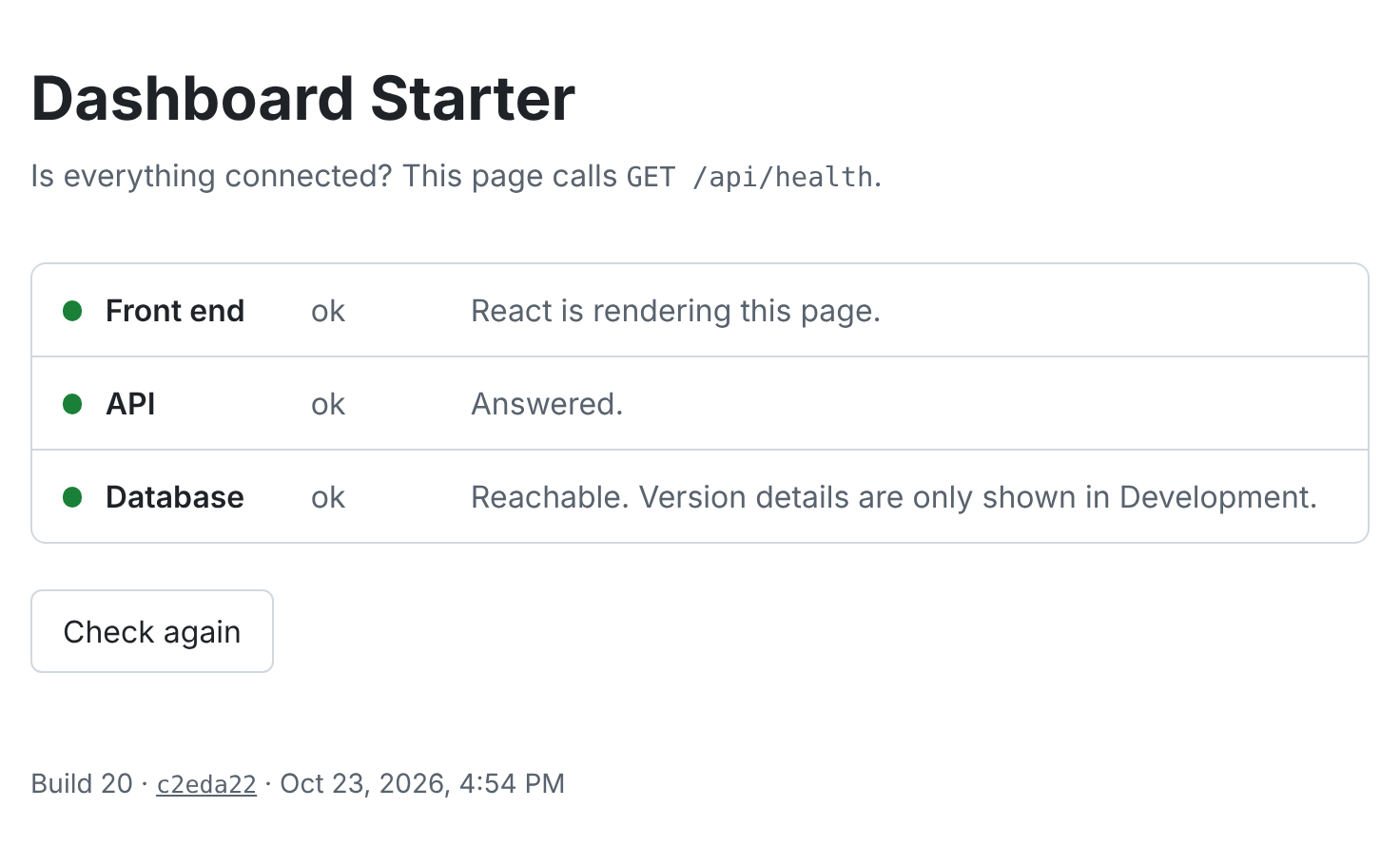
There's exactly one case where the two halves disagree: a browser tab that was open when a deploy landed is still running the old JavaScript. The page notices that on its next health check and offers a reload.
The stamp also fixed a gap in the pipeline. The final check used to wait for "Healthy," but the previous version answers healthy too while the new one is starting. Now it waits for the live site to report the commit it just deployed.
Working with AI on this
Same setup as step 2: one AI to plan with, Claude Code to write and test. This step had a different flavor, because half the work happened outside the repo, in Azure, GitHub settings, and DNS.
The human runs the setup. The AI wrote the Bicep, the workflows, and the setup guide. I ran every command that touched my Azure subscription and GitHub settings. Same split as branch protection in step 2, and still the right one.
The AI can't see everything. Its sandbox couldn't read the GitHub Actions logs or reach the live site, so for every failure I ran a command and pasted the output back. That loop worked well, and it made me read every error myself.
It was wrong about the outside world. Two of the three failures were the AI's: the guide used the old subject format, and the runner's database check had only ever been tested against SQL Server, not Azure SQL. Neither is something you'd catch by reading the code. You catch them by deploying. One more reason to deploy early.
It pushed back on things I'd have shipped. It caught that seed could have reached the live database, made the pipeline wait for the deployed commit instead of trusting "Healthy," and flagged that the CI change could cancel a deploy halfway. When I asked whether my screenshots of the Azure portal leaked anything, it pointed out that the subscription ID was already in the public deploy logs, and that it isn't a secret: knowing it doesn't let anyone in.
Michael's tip
This step went pretty well. If I had manually connected the pipeline, it might have gone smoother but it definitely would have taken longer. I have deployed a lot more from Azure DevOps, so letting Claude write the Bicep code makes a lot of sense.
What I'd do differently, and what's next
I'd deploy in step 1. Not the whole pipeline, just something live. Every failure in this post was cheap to fix because the app was tiny. The same three bugs on top of auth and a data grid would have been a much worse week.
Michael's tip
One of the first approaches I will take to a new problem is to create the smallest possible slice of it and see what I can learn. This comes out of lean thinking and I believe helps surface integration issues long before they become panic-inducing.
I'd also run the setup guide myself before writing it down as done. It was written before anyone had run it, and the first person to follow it (me) hit the subject format problem, and needed a workaround for a Git Bash quirk that rewrites /subscriptions/... into a Windows path. Both are in the guide now.
Next up, for real this time: the app shell. A sidebar, a top bar with a tenant switcher, and light and dark themes, built on plain CSS and the browser's own elements, with React Router in its plain declarative mode. Now every step of it will be live at dashboard.mvmorten.com the moment it merges.
The code for this post is tagged v0.3. The deploy guide is in docs/deploy-azure.md if you want your own copy running. Tell me what breaks.