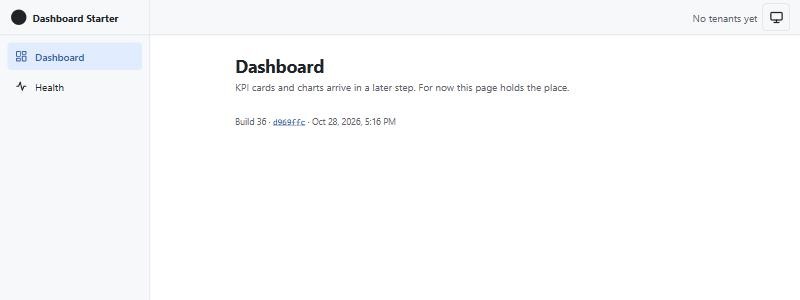
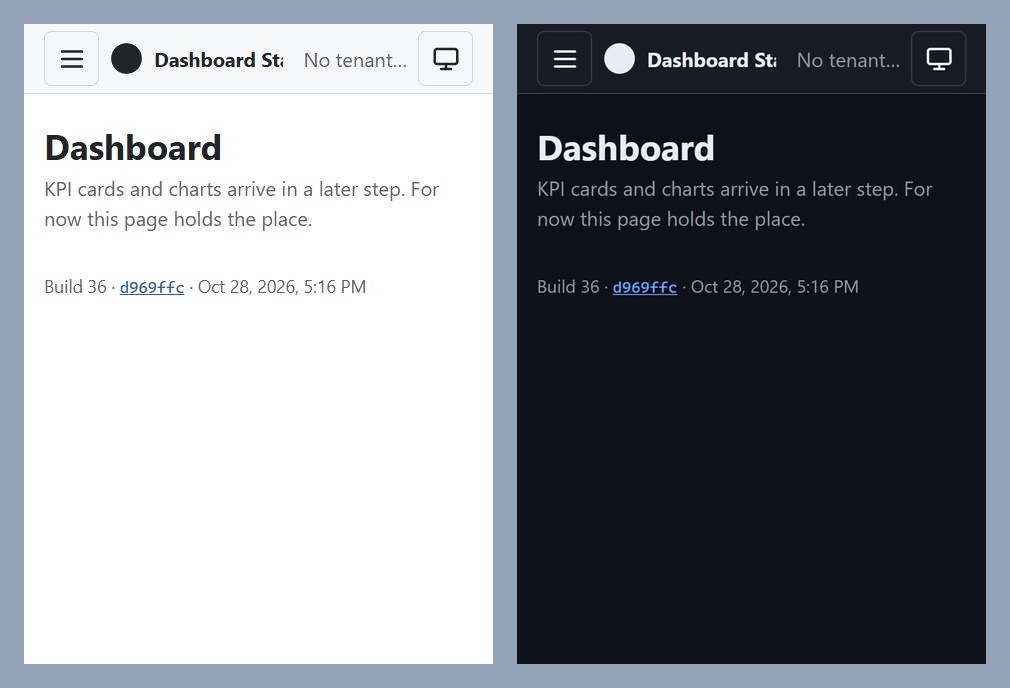
Step 4 is merged, and dashboard.mvmorten.com is no longer one health page. It has a sidebar, a top bar with a tenant switcher and a theme toggle, light and dark themes, and three routes: a dashboard placeholder, the health page, and a 404.
It's still a small app. But it now looks like the thing it's going to be, and it's the first step where the front end made real decisions. Most of this post is about what I chose not to add.
Michael's tip
That first moment when you see your creation take life is always satisfying!
No UI kit
I've used Mantine on real projects and I like it. So this wasn't "kits are bad." It was a question of whether this project needs one.
A kit is a big dependency, and it becomes every fork's lock-in. Mantine is well maintained, but it leans heavily on one maintainer and donations. That's a fine risk for my own product and a worse one for a starter that other people will copy. Plain CSS plus the browser's own elements is easy to swap out later. A full kit isn't.
So the shell is plain CSS. One file holds the design tokens: colors, spacing, and radii, with light and dark values. Then come base, shell, and page styles. I split the files by concern, not by component, because the shell pieces all share one grid and are small. A stylesheet per component would have added imports and nothing else.
It's mobile first, per the rule in CLAUDE.md. The base layout is a phone. One min-width media query turns the slide-out drawer into a permanent sidebar on wider screens.
Michael's tip
I expect to pick a UI kit at some point, once there are real needs. I don't really want to be the 10,000th dev to create an autocomplete select control.
The browser already does most of this
Almost every piece of the shell has a native element that does the hard part.
The phone menu is a <dialog>. The menu button calls showModal(), and the browser handles the backdrop, trapping focus, and closing on Escape. We add two things: focus goes back to the button when the dialog closes, and following a link closes it.
Focus moves to <main> after each route change. In a single page app the browser doesn't reload, so a keyboard or screen reader user would otherwise stay stranded in the sidebar. A skip link and the header, nav, and main landmarks cover the rest of the basics. The icons are inline SVG we own, no icon library.
The theme has three states. System, light, and dark, saved under one localStorage key and applied as a data-theme attribute on <html>. The catch with any saved theme is the flash: the page loads light, then JavaScript flips it to dark. A tiny inline script in index.html applies the saved theme before first paint, so there's no flash. One note for later: if the app ever gets a Content Security Policy, that script will need a hash or a nonce.
The tenant switcher, and the library I didn't add
The tenant switcher was the one component I expected to need a headless library. Menus and listboxes are where accessibility gets hard: arrow keys, focus handling, closing on Escape, returning focus to the trigger.
So the rule was to try native first. The Popover API turned out to do most of it. It gives light dismiss (click outside to close) and returns focus to the trigger. We added focus moving into the list when it opens and arrow key movement between options, about 30 lines. The build log says it was checked with real keystrokes: Enter opens the list with focus inside, arrows move, Enter selects, Escape closes, and focus lands back on the trigger.
That's the dependencies principle working the way I wanted. A library has to earn its place, and here it didn't. If a later component (a date picker, a combobox) genuinely needs one, I'll pick a headless library then and justify it in that PR.
The three dependencies that did earn their place
Step 4 added exactly three, each with a row in the README's Dependencies list.
React Router, for necessity. The browser has no built-in client-side routing with history. I'm using declarative mode only: BrowserRouter, Routes, Route, NavLink. No framework mode, no loaders, no actions. Data fetching stays in our own code.
TanStack Query, for correctness. This is the same argument as Dapper: hand-rolled useEffect fetching is where stale data, double requests, and missed cancellations come from. It sits on top of a plain fetch client in one small api.ts, so Query only decides when to call it. There's one hook per resource, useHealth and useTenants, and components never call useQuery directly. The health page's hand-written AbortController fetch moved onto this pattern. api.ts also has a clearly marked spot for the antiforgery header that arrives with auth.
The Query devtools, development only. They're lazy imported behind import.meta.env.DEV, so production builds leave them out.
No UI kit, no icon library, no test library. Tests get their own step.
The tenants endpoint that returns nothing
The switcher needs a list of tenants, but there's no authentication until step 5. The plan was a temporary GET /api/tenants.
What I wasn't sure about was how to do that honestly. A public, unauthenticated endpoint that lists tenants looks like a security hole, and in a starter whose whole pitch is tenant isolation, I didn't want anything pretending to enforce it.
The build ended up simple. The endpoint is a real Dapper query on dbo.Tenants, clearly marked as a stub. It doesn't enforce isolation, and the code says so. And because the seed only runs in Development, the live database has no tenants at all. So the live site returns an empty list and the switcher says "No tenants yet." No demo names are exposed publicly, and I didn't have to hard-code a fake list or seed demo data into production to make the screenshot look good.
On my laptop, where the seed has run, it returns the two demo tenants. In step 5 the endpoint turns into "the tenants this signed-in user belongs to," and the switcher's choice moves from localStorage into the auth cookie.
Michael's tip
We'll hold off populating data until auth is in place. That's how I'd do it on a "real" project.
Deep links and refresh
This was deferred from the deploy step on purpose. The API serves the built React app from wwwroot, which works for /. But refresh the browser on /health and the server has no file by that name, so you'd get a 404 from the API instead of the app.
The fix is a fallback. Outside Development, any route that isn't an API path or a real file serves index.html, and React Router takes over. It's one line of endpoint routing, not a minimal API endpoint, so it doesn't break the controllers rule.
The other half matters just as much. An unknown /api/* path must not return the HTML page, because a client would try to parse it as JSON. A small ApiNotFoundController answers those with a JSON 404.
CI now proves all of it. A new step builds the front end into wwwroot, runs the API in Production mode, and checks four things: /health returns the page, /api/nope is a JSON 404, /missing.js is a plain 404, and /api/tenants returns JSON. The same lesson as step 3: a claim in the docs isn't real until something checks it.
Security checks while it's cheap
Between the shell PRs I added a side step, PR #14, because it's cheapest now while the app is one page and there's nothing to triage.
I'd looked at whether the project qualifies for Anthropic's new OSS Scanner. It doesn't yet: the program is for established projects with real users and dependents. So the PR sets up the free version of the same idea. CodeQL scans C#, TypeScript, and the workflow files on every PR, on pushes to main, and weekly. Dependabot opens weekly update PRs for NuGet, npm, and GitHub Actions. There's a SECURITY.md that says to report vulnerabilities privately through GitHub. None of it adds a dependency to the app.
Two decisions came out of that, and both are the no-magic rule again.
A workflow file, not default setup. GitHub offers CodeQL as a one-click setting with no file in the repo. I'd already switched it on, and it can't run alongside a workflow file. We flipped back and forth, then settled on the file. A workflow is something a reader can open and see exactly what runs, and it comes with every fork. A setting does neither.
CodeQL without a build. For C#, CodeQL can build the project or just read the source. Reading the source is a little less precise, but it means the job needs no SQL Server, no npm install, and no dotnet build. Plainer won. It's also its own workflow, so a finding shows up as its own check and never holds up a deploy.
actions is a CodeQL language now too, which catches workflow mistakes like untrusted input in run: steps. That's worth having next to a deploy workflow that holds Azure credentials.
Dependabot's first PR
The very first Dependabot PR moved @types/node from 24 to 26, and I approved it without noticing the major version jump.
Nothing broke. But the types describe a Node version, and this project runs Node 24. With Node 26 types, TypeScript would accept Node 26-only APIs in vite.config.ts that then fail on the Node we actually run. The fix (PR #16) pinned the types back to the Node 24 line, told Dependabot to ignore majors of that package, the same way TypeScript is pinned, and put the reason in the README.
It's a small story, but it's the honest kind: the automation found a gap in the automation's config, and a human approval didn't catch it. Grouping minor and patch updates is fine. Majors deserve a second look.
Michael's tip
This is the double-edged sword of AI-assisted development, or any development. Things go well except when they don't. This is why we have Git and CI/CD: so we can fix it fast.
Working with AI on this
Same setup as the last two steps: one AI to plan and write the brief, Claude Code to build and test.
The brief asked the questions. I wrote the tenant stub and the theme persistence into the brief as "questions for me, with a recommendation" instead of decisions. That worked: the answers came back with reasons, and the one I was most worried about (exposing demo tenants publicly) resolved itself in the build.
A stale clone. Claude Code's local main was behind origin/main, so the step 3 build stamp code was missing at first. It noticed, read the file from origin/main, and pulled before branching. Cheap to catch, expensive if it hadn't.
The launch profile again. It ran the API with dotnet run, which applied the launch profile, forced Development on port 5080, and ignored the Production settings it was testing. That's the same trap as the deploy post's migrate bug, and the fix was the same --no-launch-profile. I'm starting to think it deserves a line in CLAUDE.md.
What was and wasn't checked. The build log is explicit. At 360, 390, and 768 pixels there's no horizontal scroll and every touch target is at least 44 pixels, except the dev-only devtools button. The drawer, focus return, 404, and theme cycle all work, and the dark theme survives a reload with no flash. A /security-review found nothing, apart from noting that the open tenants stub is by design. What hadn't been checked at the time of the PR: both themes at every width by eye, and the live site after deploy. I covered both afterward.
After the merge I did the manual pass on the live site, and it turned up nothing.
What I'd do differently, and what's next
I'd decide the theme and the tenant stub in step 3. Neither is hard, but making the decisions while the shell was still a sketch would have saved a round of questions.
Left over: the logo is a placeholder circle until the Illustrator design exists, and the tenant switcher is a stub until auth lands.
Next up is authentication. Own user tables, Argon2id, cookie auth, no Identity, no JWT, and the API's tenant list becomes the signed-in user's tenants. A lot of what's waiting is hosting-shaped (forwarded headers, HSTS, Data Protection key persistence), which is exactly why I deployed first.
The code for this post is tagged v0.4. Go to dashboard.mvmorten.com, resize the window, and try it with only the keyboard. Tell me what breaks.