Step 2 is done: you can clone dashboard-starter, run six commands, and get a React page that proves the front end, the API, and SQL Server are all talking to each other.
That was supposed to be the whole post. The repo structure, Docker, a migration runner, a health check. The plumbing.
But before writing any code, I went back over the stack I announced in post 1, and I ended up changing a surprising amount of it. Some of those choices were mine. A lot of them were defaults: the things an AI assistant suggests, a template generates, or every tutorial assumes. So half of this post is about the plumbing, and half is about questioning defaults, including the ones I'd written down myself a day earlier.
The theme that showed up: no magic
One idea ended up behind almost every decision in this step: if a tool does a lot of work you can't see, pick the plainer option you can read.
I didn't start with that rule. It surfaced because I kept rejecting things for the same reason. Entity Framework, ASP.NET Core Identity, an API that migrates its own database on startup: each one works, and each one hides what it's doing. When something goes wrong, you end up reading framework source code to find out why.
That's fine for a lot of teams. But it made me write down who this project is actually for:
This project is for developers who want to understand the whole stack. You should be able to follow any feature from a React component, through the API, to the exact SQL it runs, without digging through framework internals.
That line now sits at the top of the README, and most of the decisions below follow from it. It's also why this isn't a project for DBAs, or for people who want the most features per line of code. It's for people who want to know how the thing works.
Defaults I changed
Six decisions changed between post 1 and the first line of code. Some came from my own post, some from AI suggestions, some from what the templates generate.
| The default | What I chose instead | Why |
|---|---|---|
| Entity Framework Core with generated migrations | Dapper and hand-written SQL | I want to read every query, tune it, and run it in SSMS. And Dapper does earn its place: hand-written row mapping is just asking for errors to happen. |
| Multi-tenancy "out of scope for now" | Tenant-aware from the first script | Bolting a TenantId onto a live schema means touching every table, index, and query. Adding it on day one costs almost nothing. |
| The API runs migrations on startup | An explicit migrate command | A database that changes because you started the app is magic. You run dotnet run --project src/Db -- migrate on purpose and see exactly what it applied. |
| ASP.NET Core Identity | Our own user tables and cookie auth | Identity always felt too magic to me; it's hard to trace why it does what it does. Its built-in UI is Razor Pages, which a React app doesn't use anyway. |
| Queries in stored procedures | Inline SQL in the C# that uses it | Procedures have their place, but splitting every query between C# and the database is a maintenance headache in a codebase meant to be easy to follow. |
Queries in separate .sql files | Inline, in raw string literals | I liked the idea for tuning, then realized I'd never worked that way. Inline keeps the SQL, its parameters, and the result mapping in one place. Easier to follow. |
Two of these are worth a closer look.
The migration one was an AI suggestion I said no to. When I said I wanted plain SQL scripts in a folder, the AI's next suggestion was to have the API run them at startup in development. Reasonable, common, and exactly the kind of hidden behavior I'd just rejected EF for. That's the pattern I'm learning to watch for: the suggestion that's fine on its own but quietly contradicts a decision you already made.
The .sql files one is me talking myself out of my own idea. Separate files are genuinely nice when you're tuning a query. But I asked what inline buys you beyond visibility, and the list was long: the SQL and its C# mapping change together, there are no string keys to typo, dynamic queries are natural, and it's what every Dapper example looks like. Liking an idea isn't the same as it being right for the project.
Defaults I questioned and kept
Questioning a default doesn't mean changing it. Three times, I pushed on a choice and it held.
Docker for the database. Thinking about a junior developer cloning this for the first time, Docker felt like an extra layer they might not need. The AI suggested supporting any SQL Server you already have, with Docker as an option. But I promised to be opinionated, and three supported setups is exactly the menu of options I said this project wouldn't be. Docker is the one setup that works the same on Windows, Mac, and Linux, and it pins the SQL Server version so every laptop matches CI. It only runs the database; the API and front end run natively, so debugging works normally.
SQL Server, even on a Mac. Then I learned SQL Server's container image is Intel only, even SQL Server 2025. On Apple Silicon it runs under Rosetta emulation. My first reaction was to switch to MySQL. Looking at the cost ended that quickly: no Row-Level Security, no temporal tables, and a completely different pitch for the project. In practice, with Rosetta turned on in Docker Desktop, it runs fine for development. Slower than native doesn't matter when your database holds seed data. Don't let a laptop quirk pick your database.
One shared database for every tenant. I've worked on systems with a separate database per client, and it caused a lot of issues: migrations that have to run N times, schemas that drift apart, deploys that half succeed, and reporting that has to query every database. One shared database is the SaaS economy of scale. If someone tells you each client needs their own database, ask what they're actually protecting against. Data leaking between tenants is handled by Row-Level Security. The honest weak spot of a shared database is restoring a single tenant from backup. Data residency laws are a real reason to split, but by region, not by client.
One more thing kept, sharpened rather than changed: one user account across many tenants. In almost every production system I've worked on, people don't want an account in every organization they work with. They want one account that works everywhere. So users are global, memberships live in TenantUsers, and roles are per tenant.
Committing straight to main
The first few commits went straight to main. I noticed partway through planning, and switched to GitHub flow before any real code landed: a branch per change, a pull request, CI checks, squash merge.
With one person on the project, that's not strictly necessary. But it's a good habit, and it keeps you out of trouble: no half-finished change or broken build on main, and one last look at the diff before it lands. And if you ever work on a team, which is highly likely, you definitely won't be committing to main. Or you shouldn't be. This is also a starter other people will fork, so it should show the workflow worth copying.
A few things I learned setting it up:
- Branch protection is free on public repos, even on GitHub Free. Private repos need a paid plan for the rules to actually be enforced.
- The rules that matter: require a pull request (0 approvals, since you can't approve your own), squash merge only, linear history, no force pushes, and required status checks from CI.
- Check that the rules took. My first pass at the ruleset missed "Require a pull request before merging," the one rule that actually blocks direct pushes. Checking the active rules afterward caught it. And PR #1 went in as a merge commit, because I hadn't switched the repo to squash-only yet.
- Settings stay with the human. The AI could write code and open pull requests, but it wasn't allowed to change repository settings, create tags, or publish releases. I did those by hand. Honestly, that's the right split.
What step 2 actually built
After all that, the code. From a fresh clone:
cp .env.example .env
docker compose up -d --wait
dotnet run --project src/Db -- migrate
dotnet run --project src/Db -- seed
dotnet run --project src/Api
cd src/Web && npm install && npm run dev
Open the front end and you get three green checks: front end, API, and database, with the schema version the database is on.
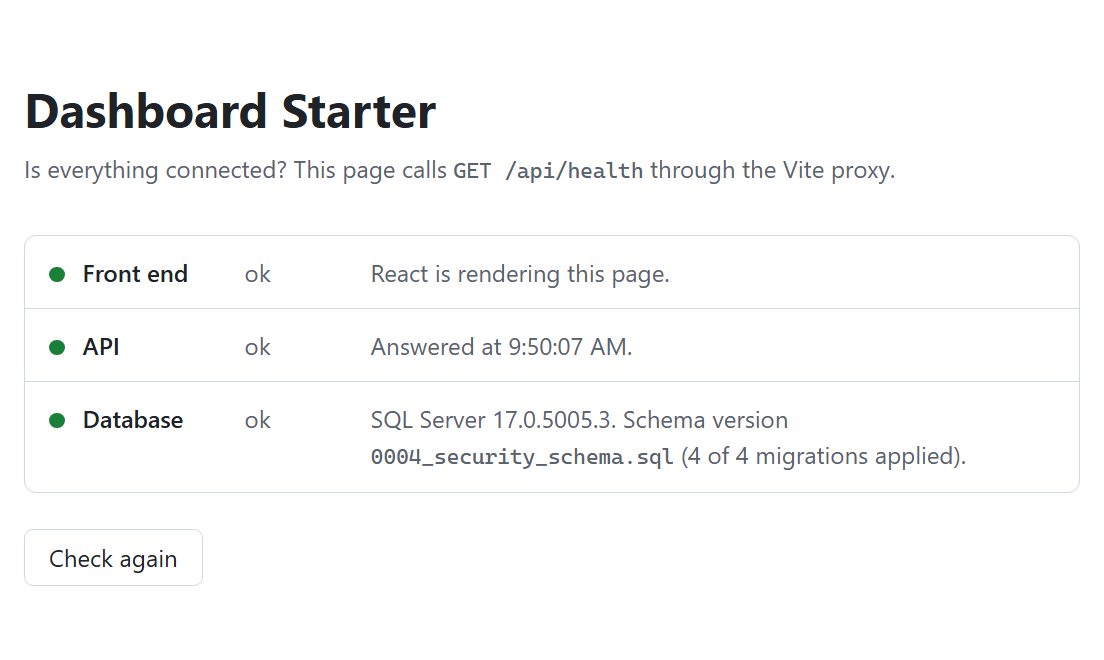
The browser only ever talks to the Vite dev server, which forwards /api to the API. Only the Db runner changes the schema; the API checks the migration journal at startup and refuses to run if it's behind.
The migration runner (src/Db) is the only thing in the repo that changes the schema. Scripts live in /sql: migrations run once, in order, and are never edited after they run; programmable objects (views, functions) use CREATE OR ALTER and rerun every time; seed is development data and refuses to run anywhere else. Every migration is idempotent, so it checks before it changes. The runner records each one in a SchemaVersions table with a SHA-256 hash of its contents, skips what's already applied, and stops cold if someone edits a migration that already ran. It prints applied, skipped, or failed for every file, so there's nothing to guess.
The first schema is the multi-tenant foundation: Tenants, Users, and TenantUsers, plus the Row-Level Security predicate that will keep each tenant's rows separate once the first tenant-owned table arrives. The seed creates two demo tenants and one demo user who belongs to both, so multi-tenancy is visible from day one.
The API checks the schema at startup and refuses to run if a migration is pending, with a message that names the command to run. It never changes the schema itself. Its one endpoint, GET /api/health, reports whether the database is reachable, with version details only in Development so production doesn't advertise what it's running.
CI runs on every pull request and does more than build. It starts the same SQL Server image as a service container, checks that the API refuses to start before migrations, runs migrate twice and asserts the second run applies nothing, seeds twice, hits the health endpoint, then edits a migration and asserts migrate fails. The front-end job runs lint, the format check, and the build. Both are required before anything merges.
A few conventions are enforced by the build rather than by review: warnings are errors (including code style), 2-space indentation everywhere (4 eats up way too much space), braces on every if, early returns over nesting, and log messages as templates rather than interpolated strings. If you're indented 14 levels deep, there's probably a bigger issue at play.
And a principle, loosely held: no libraries until we have to. A package has to earn its place through necessity, safety, or a real gain in correctness. The README has a table listing every dependency and why it's there.
Working with AI on this
I used AI for most of this step, in two roles: a planning partner to argue decisions with, and Claude Code on my machine to write and test the code. A few things I'd pass on.
Check that the defaults it suggests are what you want. This is the real lesson of the step. Every default in the "changed" table above is something an AI would happily build for you, because it's what most projects do. It's not wrong. It's just not a decision. The AI was genuinely useful at laying out tradeoffs once I asked, but it never stopped to ask whether I wanted EF Core in the first place.
Write your decisions down where the AI will read them. Before handing the code to Claude Code, I added a CLAUDE.md file to the repo: the short list of rules, conventions, and a "Do not" list (no EF Core, no Identity, no migrations on startup, no interpolated SQL). Claude Code reads it at the start of every session. Without it, it would have fallen back to exactly the defaults I'd spent an evening rejecting. Anyone who forks the starter gets the same file, so their AI tools pick up the conventions too.
It asks good questions when you let it. Mid-build, Claude Code stopped to ask things I hadn't thought about: how the .NET apps should get the database password from .env, which compiler warnings should fail the build, and whether to use the SQL Server I already had installed when it couldn't find Docker. On that last one I said wait. I installed Docker so we'd build against the documented setup, not a shortcut no reader would have.
It finds real problems. Its build log is some of the best material in this post. On Windows, SQL Server connections to localhost timed out behind Docker Desktop while 127.0.0.1 worked. A package pulled in by the SQL Server driver had a published vulnerability, so it pinned the patched version and flagged it. It worked out that once Row-Level Security is active, the predicate function can't be altered in place, five steps before we'd have hit it.
Review it anyway. I still reviewed the pull request like any other. That review caught a health endpoint telling anonymous callers the exact SQL Server version, a logging rule that was written down but not enforced by the build, and decisions I'd made in chat that never made it into the repo. The AI is fast and thorough. It's not the one accountable for what ships.
What I'd do differently, and what's next
I'd write the decisions down before the first commit. Most of this post is me revisiting choices from post 1 a day after publishing it. That's fine for a build-in-public series, since the changes are the story. But if I were starting a real product, I'd spend the first hour on a decisions list and a CLAUDE.md, not on code.
I'd turn on branch protection on day one. It takes five minutes, and it's much easier than noticing later that you've been pushing straight to main.
What's not tested yet: the Apple Silicon path. CI covers Linux and I tested on Windows, but nobody has run the getting-started steps on an M-series Mac with Rosetta. If you try it, I'd like to hear how it goes. Open an issue either way.
Next up: the app shell. A sidebar, a top bar with a tenant switcher, and light and dark themes. The front-end library decisions go under the same "no libraries until we have to" rule. I'm leaning toward no UI kit at all: plain CSS and the browser's own elements for the shell, React Router in its plain declarative mode, and TanStack Query once real data shows up. I used Mantine on a previous project and liked it, but I'm not sure this project needs it, and a starter people fork shouldn't lock them into a kit.
The code for this post is tagged v0.2. Clone it, run the six commands, and tell me what breaks.