Step 9 is live. Open dashboard.mvmorten.com, click "Try the demo", and go to Customers. Your sandbox has 30 of them. Open one in two tabs, change it in both, and save both.
That last part is what this post is about. But first the app needed a table that belongs to a tenant, and that table had to switch on the safety net the README has promised since post 2.
The table every fork copies
Customers is the first table that belongs to a tenant. Every fork will copy it for its own tables, so it's meant to be boring.
It has a name, email, phone, a status (Active or Inactive, a CHECK constraint for now) and notes. Then the standard columns: TenantId, CreatedAt and CreatedBy, UpdatedAt and UpdatedBy, DeletedAt and DeletedBy, and RowVersion. The README now lists them as the convention for any table a tenant owns.
A few choices worth explaining:
TenantIdleads every index except the primary key, because every query asks for one tenant's rows.- The list and search indexes are filtered to
DeletedAt IS NULL, so deleted rows stay out of what the list reads. - Email isn't unique. Two customers can share an inbox, like a married couple or a small office. User email stays unique, because people sign in with it. If the app ever emails customers, it removes duplicate addresses first.
- The
*Bycolumns allow NULL. NULL means no person made the change, such as a data migration or an import. The API always sets them, from the signed-in user, never from the request.
Row-Level Security, switched on
Since post 2 the plan has been: the app filters by TenantId in every query, and SQL Server's Row-Level Security sits underneath as a safety net. Until now there was nothing for it to protect. Now there is.
The policy and its predicate live in one script. It drops the policy, changes the function, and creates the policy again, inside one transaction, so no table is ever left uncovered. With no tenant set on the connection, the policy returns no rows and refuses every write. It fails closed.
CI checks the policy covers every table with a TenantId column, except TenantUsers, the one table that's global on purpose. A test table proves the check really fails when one is missing.
Surprise: RLS applies to sa. There's no exemption for the system admin. I'd assumed there was. Every admin query in the check scripts now sets a tenant first, and the README's SSMS tip says so.
That's also the rule we picked: no login is exempt. The API sets the tenant for each request. Sandbox creation and cleanup set it for each tenant they touch. A login that skips RLS would be the easy way out, and a fork that pointed its API at it by mistake would have tenant isolation off with no error.
The trap in data migrations
With no exemption, there's a quiet way to get this wrong. Write a data migration the obvious way, UPDATE Customers SET ..., and it runs with no tenant set. RLS hides every row, the update touches nothing, and the migration "succeeds". Nothing tells you.
The brief asked for a helper and a README rule. What we ended up with is a marker. A migration that starts with -- for-each-tenant runs once per tenant, with that tenant set, all in one transaction. If it fails in any tenant, it rolls back in every tenant, and the error names the tenant.
I picked the marker over a C# hook because the migration stays plain SQL you can read and run. The rule is in the README and in CLAUDE.md.
CI proves both sides: without the marker, the probe migration changes nothing; with it, every tenant changes; and a failure in the last tenant undoes the rest.
Permissions, where Member and Read-only finally differ
Step 7 gave the app three roles, but Member and Read-only could do the same things, because there was nothing to edit. Now there is:
customers.view: Admin, Member and Read-only.customers.edit: Admin and Member. It covers delete too. A fork that wants a separate delete permission adds it with one migration.
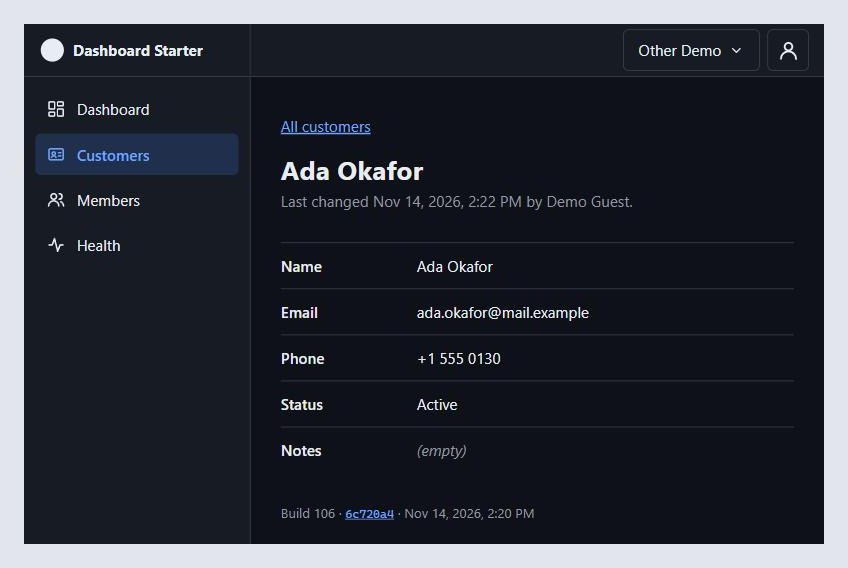
A Read-only user gets a 403 on every write, and the screens hide the controls. Your sandbox's "Other Demo" tenant is Read-only, so you can see both sides by switching.
Soft delete, said out loud
Deleting a customer sets DeletedAt and DeletedBy. The row stays, for the audit log a later step adds. After that, it's a 404 everywhere and it's gone from the list and search. There's no restore yet.
The risk with soft delete is forgetting to exclude deleted rows in one query. There are ways to hide it, like a view, or a global filter in an ORM. I wanted it obvious instead. Every query says AND DeletedAt IS NULL, updates included, and CI tests every endpoint against a deleted row.
A view was tempting, but you'd read through the view and still write to the table, so the rule would only be half enforced.
RLS doesn't hide deleted rows. It does one job: tenants.
Optimistic concurrency, and a 409 you can do something with
Every customer has a RowVersion, which SQL Server changes on every write. The form sends back the version it loaded, in the body, as Members already does. The update says WHERE RowVersion = @RowVersion AND DeletedAt IS NULL.
If no row changed, the API looks again. Gone or deleted is a 404. Still there means someone else saved first, and that's a 409.
The 409 carries the record as it is now. So the screen can merge without asking the server again.
That needed one rule written down: 409 means only "someone else changed this". The demo sandboxes cap each tenant at 200 customers. Going past it is a refusal, but it isn't a conflict, so it's a 422. With that rule, the merge screen can trust that every 409 has a current record in it.
The DELETE takes a body too, with the version you saw. That's unusual for a DELETE, but it keeps "the version you saw" in one place for every change. If someone edited the customer while you were deciding to delete it, you get the same 409 and see what changed before you delete for real.
The merge
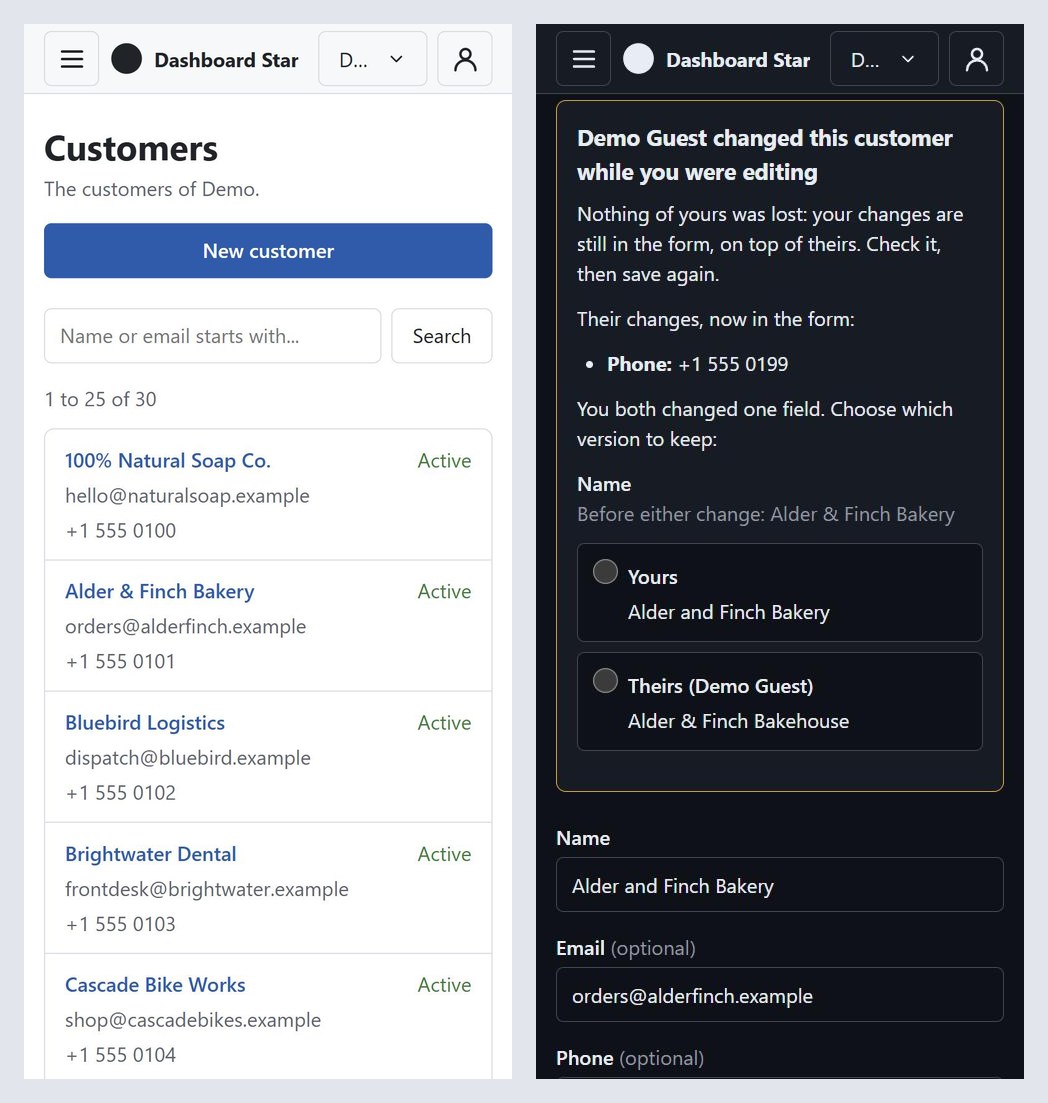
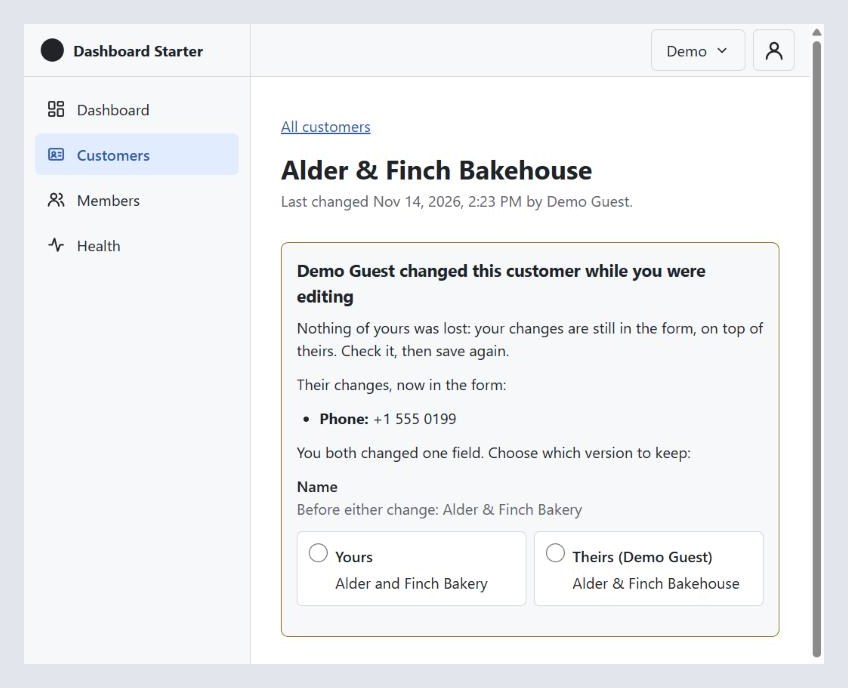
When two people edit the same customer, the second save gets a 409. The form now has three versions of every field:
- original: what the form loaded, before anyone changed anything;
- mine: what's in the form now;
- theirs: what the other person saved, from the 409.
Each field is decided on its own. If mine and theirs match, there's nothing to decide. If only I changed it, keep mine. If only they changed it, take theirs. If we both changed it to different values, that's a conflict, and the person chooses.
That's the whole function. It has no imports, no React, and no network calls:
for (const field of Object.keys(original)) {
  if (mine[field] === theirs[field]) {
    continue;
  }

  if (mine[field] === original[field]) {
    merged[field] = theirs[field];
    takenFromTheirs.push(field);
    continue;
  }

  if (theirs[field] === original[field]) {
    continue;
  }

  conflicts.push(field);
}
Keeping it pure means it's tested with Node's own test runner, node:test. There are ten tests, npm test runs them, CI runs them, and there's no test library to add. Node runs the TypeScript directly, so there's no build step for the tests either.
The values are trimmed before they're compared, because the server trims. Otherwise a trailing space in "Acme " would look like a change, or worse, a conflict.
What the screen does with the result:
- No conflicts: it says what it took from theirs, and you save again. It doesn't save for you. Nothing changes without you seeing it.
- Conflicts: each field shows the value before either change, yours, and theirs, and you pick one. Save stays blocked until you've picked them all.
- Again: the save uses theirs as the new original, with its row version. If someone saves a third time in between, you go through the same steps again.
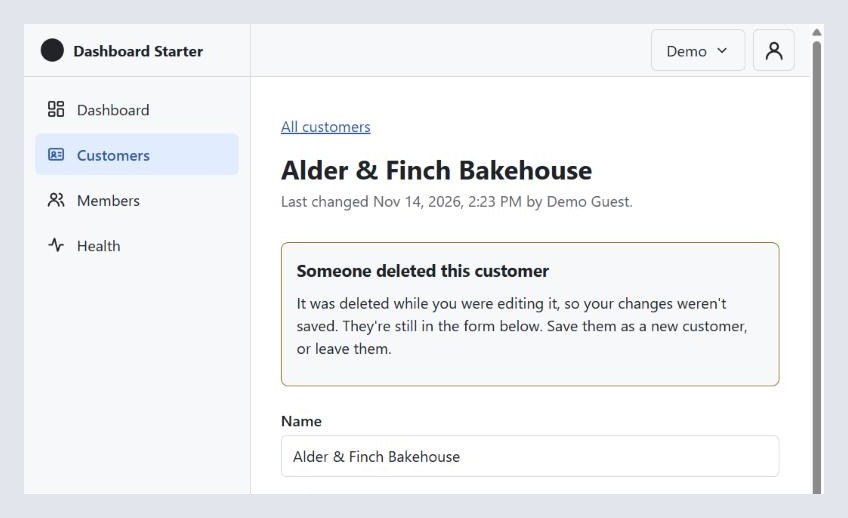
- Deleted while you were editing: it says so plainly. Your changes stay in the form, with a button to save them as a new customer.
On a phone, the choices stack instead of sitting in two columns, as in the picture at the top. On a wider screen they sit side by side.
The list and the form, kept small on purpose
The list is a table on a wide screen and cards on a phone, like Members. On a phone the whole card is the link, so it's a big tap target and there's no table to scroll sideways.
One search box matches the start of a name or email. It runs when you press Enter or Search, not on every key, so there's no request per keystroke and no timer to explain. There are 25 to a page, sorted by name, and the search and page live in the URL, so Back, a reload and a shared link all show the same page.
The search escapes %, _ and [, so typing 50% finds "50%" and not everything that starts with 50.
There are no sortable columns, filters or grid library yet. That's the data grid step.
The form is one page for new and edit. Errors come from the server and appear under each field, and focus moves to the first one. Without customers.edit, the same page shows the record to read, with no buttons. Delete asks first, on the page, not in a browser popup.
There's no client-side validation and no reusable field components. The fields are written out one by one. That's deliberate: the forms step needs something to improve, and right now you can read the whole form top to bottom.
Warning before you leave
Leaving with unsaved changes asks first. React Router's useBlocker would do this, but only in its data mode, and this app uses declarative routing, chosen in post 4. Switching modes for one warning felt like the wrong trade. So a small hook does it: the browser's own question for closing or reloading the tab, and a click listener that catches links inside the app before React Router sees them.
It doesn't cover the browser's Back button, or buttons that navigate, like signing out. The README says so.
The sandboxes, now with data
Each sandbox now gets sample customers: 30 businesses in "Demo" and 27 people in "Other Demo". Both are more than a page, so paging shows, and they're different, so switching tenants shows they're separate.
A demo tenant holds at most 200 customers, and deleted ones count, so adding and deleting in a loop can't grow the table. The count is checked in the insert's transaction, with a lock on the tenant row, so two requests at once can't both squeeze in. Tenants that aren't demos have no cap.
Cleanup removes customers first, in each tenant's own context, with the policy on. Step 8's cleanup refuses to start if it doesn't know about a table with a TenantId, and that check did its job here: Customers had to be added to the list before anything ran.
What went wrong
CI broke the old checks, not the new ones. The new customer test users went in the shared "Create users" step, and one was an Admin in the test tenant. The step 7 role check races two admins demoting each other and expects exactly one left. A third admin broke it. The customer users now get their own step, after the role checks, with a comment saying why.
The first for-each-tenant runner hid its own errors. It cleared the tenant in a finally. When a step failed inside a transaction that was already doomed, the clear threw too, and its error replaced the real one. It now clears only on success. On failure, the rollback and the connection reset clean up.
Windows paths in Git Bash. The check scripts need MSYS_NO_PATHCONV=1 for docker exec paths, but that also broke curl's /tmp and /dev/null. The step 8 upgrade check looked like it hung. Really, every health check was failing quietly. Windows only; CI runs on Linux.
A flash of the wrong tenant. Switching tenants could show the last tenant's customer list for a moment, from the cache. The tenant id is now part of every customer query key, and the form starts over when the tenant changes.
Three small UI bugs found in the browser: field errors from an earlier save stayed on screen after a later save failed for another reason; Next and Previous left you at the bottom of the page; and the delete notice read "Deleted Delta Freight Ltd.." with two periods.
Working with AI on this
Same setup: one AI to plan and write the brief, Claude Code to build.
The brief left three questions open, and they took a minute. How to keep deleted rows out, how to guard data migrations, and the demo cap. The brief asked for a recommendation on each, and I answered yes, yes, yes. Writing the question down with a recommendation was most of the work.
The build didn't follow the brief exactly, and that was right. The brief said "a helper that loops over tenants". It ended up as a marker in the SQL file instead, which fits "every database change is a SQL script" better than a C# hook would.
It wouldn't work around a denial. It couldn't install jq on my machine, and the permission check refused the download. It didn't find another way in. It tested by hand with a small Python helper, said so in the PR, and left a checkbox: the jq scripts got their first real run in CI.
It found its own way to test a phone. Chrome wouldn't make the window 390 px wide, so it loaded the app in a 390 px frame on the same site, which gives the page a real phone-width viewport.
It cut a test. "They changed it back" turned out to test the same thing as "only I changed it", so it went.
The upgrade test is real now. CI builds a database with step 8's own code, pinned to its commit, signs a sandbox in, then migrates it with this build. Step 8's API keeps working on the new schema, as it would mid-deploy, and the new cleanup removes the old sandbox with the policy on. I also ran it on my own step 8 database, with a backup first.
/security-review ran on both PRs and found nothing. On the API: values are parameters, the LIKE escaping, tenant isolation in queries and in RLS, smuggled fields like tenantId in the body, permissions and antiforgery, and that the 409 body holds nothing GET doesn't already show. On the screens: antiforgery on the new DELETE, and that every value renders as text, not HTML.
What's next
Post 10 is the data grid: the sorting, filters and column choices this list left out on purpose. After that, forms, which will have this plain form to improve on.
The code for this post is tagged v0.9. Try the demo, open a customer in two tabs, and make them fight. Tell me what breaks.