Update, November 13, 2026: the shared demo account in this post is gone. Every visitor now gets a private sandbox instead; post 8 explains why.
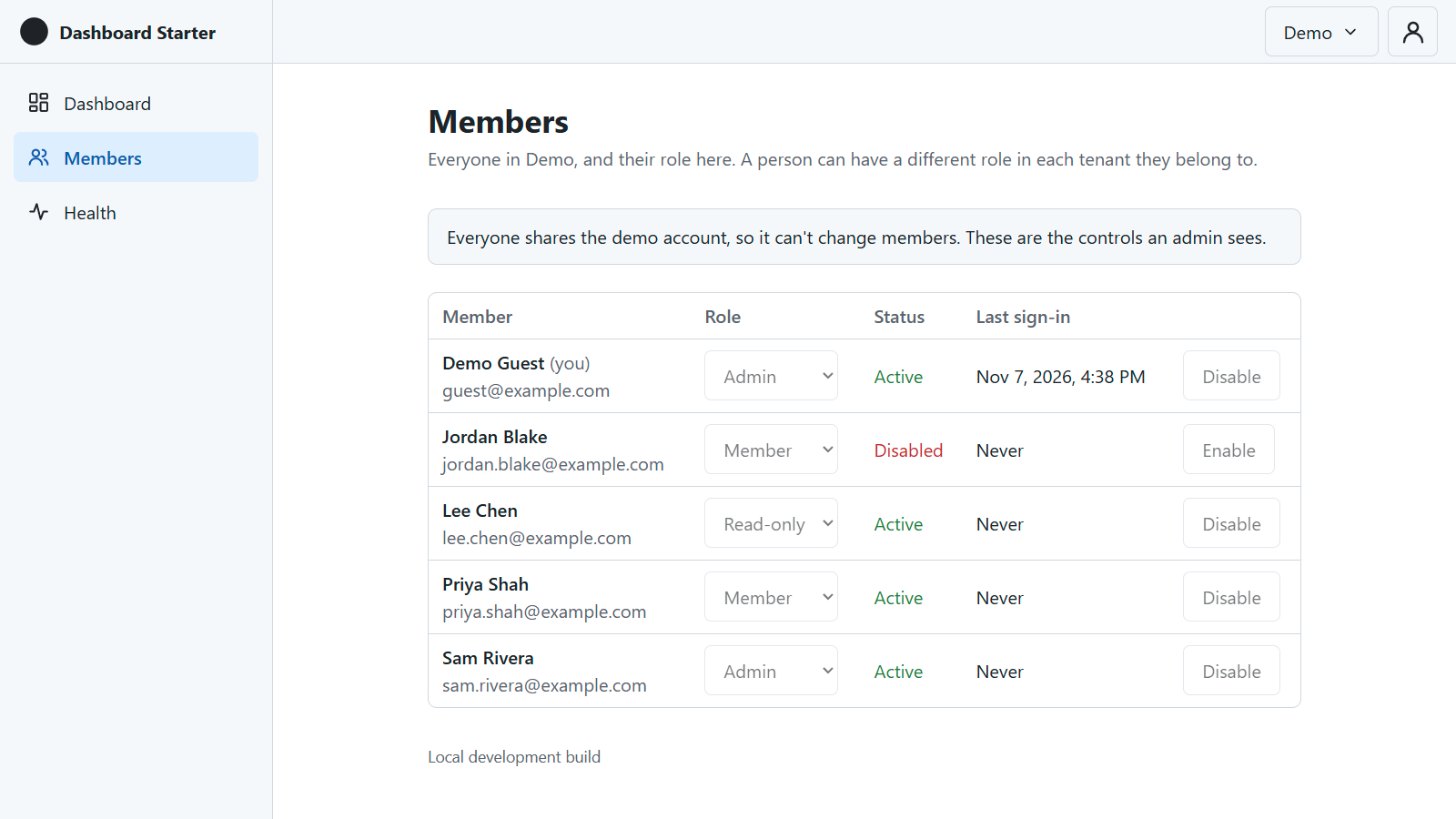
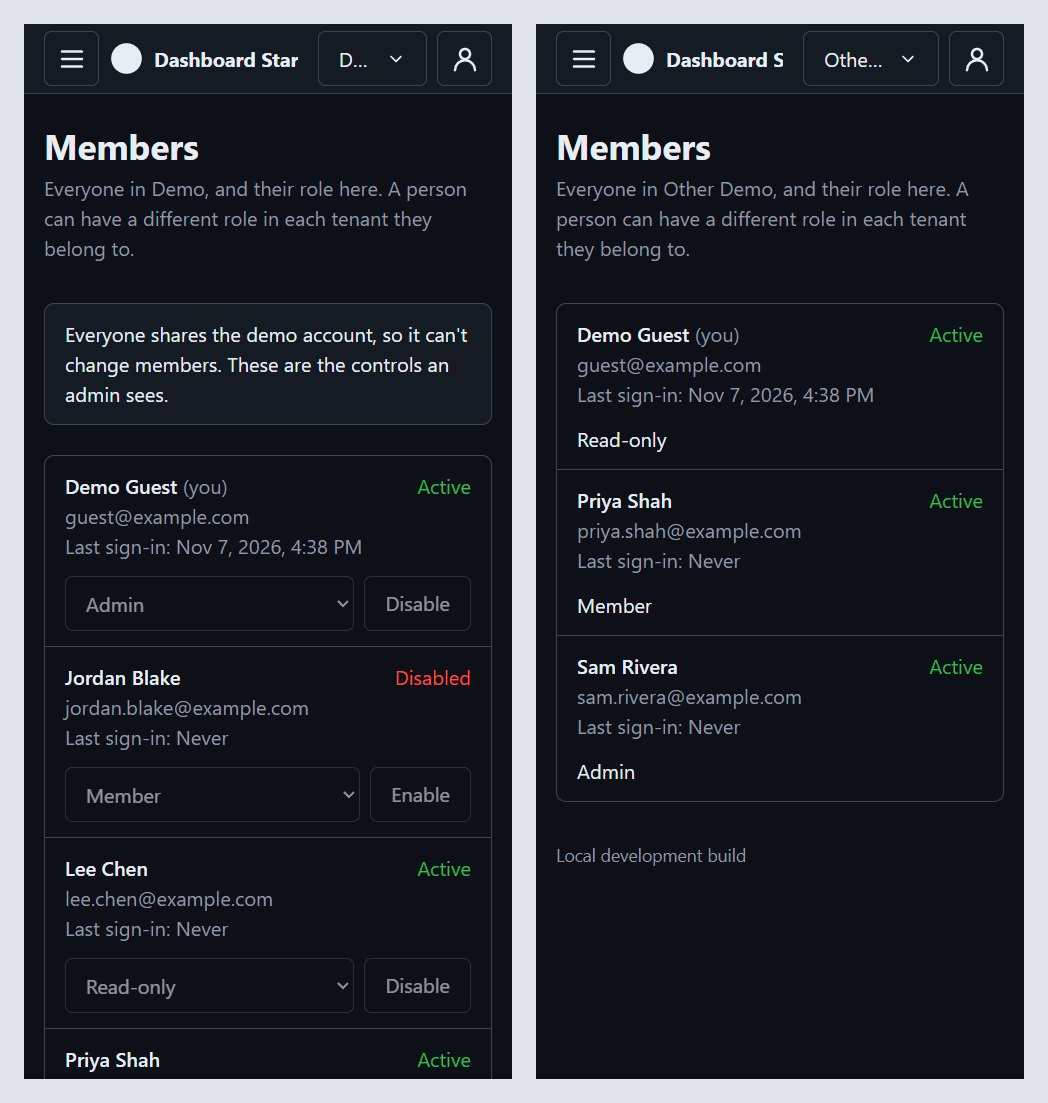
Step 7 is merged: roles, permissions, and a Members page. Sign in at dashboard.mvmorten.com and open Members. In the "Demo" tenant the demo account is an Admin, and it sees the controls to change roles and disable people, greyed out. Switch to "Other Demo" and it's the same account as Read-only: no controls, just the list.
That switch is the whole idea of this step in one click. Same person, different tenant, different permissions.
Code checks permissions, never roles
The rule for this step came first, before any code: nothing in the app asks "is this user an Admin?" It asks "can this user manage members?"
A permission is an area and an action: members.view, members.manage. They all live in one file, Permissions.cs, each with one line saying what it allows. A role is just a named set of them, defined in the database by a migration:
- Admin:
members.viewandmembers.manage - Member:
members.view - Read-only:
members.view
Yes, Member and Read-only are the same today. There's nothing to edit yet. When the CRUD module lands, it brings its own permissions, an edit for its records, and grants them to Admin and Member only. That's when the two split.
Why bother? Because if (role == "Admin") spreads. Six months in, a fork wants an "Owner" role above Admin, or a "Billing" role that can see invoices and nothing else, and every one of those checks has to be found and rewritten. With permissions, a new role is a migration. The code that checks doesn't change.
Roles aren't editable in the app. They're part of the app's design, like its tables. Editable roles is a real feature for some products, and a fork can add it, but a starter shouldn't guess at it.
One role per tenant
Roles are per tenant. You can be an Admin in one and Read-only in another, which is exactly what the demo shows.
The README had promised a TenantUserRoles table. It's a column instead: RoleId on TenantUsers, the table that already says who belongs to which tenant. The rule is one role per membership, and a column keeps that rule by itself. A separate table would need an extra index to say the same thing, and one more join on every request.
Existing memberships got the Member role when the migration ran. That errs toward less access: nobody becomes an admin by accident. A fork makes its first admin from the command line:
dotnet run --project src/Db -- set-role --email [email protected] --tenant "Acme" --role AdminWhere the permissions come from
This is the part that matters most, and it's the easiest to get wrong.
The obvious place to keep someone's permissions is the sign-in cookie. Sign in, look up the role once, put it in the cookie, done. The problem is what happens when an admin takes someone's access away. The cookie still says they have it, and it keeps saying so until it expires. The README promises that removing access works right away, and a cookie can't keep that promise.
So permissions come from the database, on the same check that already runs on every request. Since step 5, each request confirms the session is still valid: the password hasn't changed, the account isn't locked, the user is still in this tenant. That check is cached for up to a minute so it doesn't hit the database every time. It now brings back the user's permissions in the current tenant with the same query.
When someone's role changes on the Members page, their cache entry is cleared, so their next request usually sees the new role. From the command line, it takes effect within the minute.
On the API side, an endpoint says what it needs:
[Authorize(Policy = Permissions.MembersManage)]One small handler, about 20 lines we own, answers every one of those policies. Not signed in is a 401. Signed in without the permission is a 403, with a plain message.
The front end gets the same permission list from /api/auth/me, and one helper, can("members.manage"), hides the menu item and buttons you can't use. That's a convenience. The API checks again on every request, so hiding a button isn't what keeps anyone out.
A tenant always keeps an admin
The Members page has three rules, and all three are enforced by the API. The page only mirrors them.
- You can't change your own role or disable yourself.
- The shared demo account can look but can't change anything.
- A tenant can never lose its last active member who can manage members.
The last one hides a race. Two admins, each demoting the other at the same moment. Each request checks "is there still another admin?", each sees yes, both succeed, and the tenant has nobody left who can fix it.
The fix is a lock. Every membership change starts by locking that tenant's row in the database, so changes to one tenant happen one at a time. Inside the lock, it checks again that the person making the change can still manage members, makes the change, then counts. If the count is zero, it rolls back.
CI fires both demotions at once on every pull request. Exactly one wins. In practice the loser is refused one step earlier than I planned: by the time its turn comes, it's no longer an admin, so it gets a 403 before the count ever runs. The count is still there as the backstop for the command line, which has no "person making the change."
The rule is also written as "someone who can manage members," not "an Admin." That kept role names out of the code, and it means a fork's Owner role gets the same protection for free.
The demo account, and people to look at
The demo account is shared by everyone who visits, so it can't really manage anyone. It sees the Members page with an admin's controls, disabled, and a notice saying why. The API refuses its changes anyway, the same way it refuses a password change.
The first version had a problem: the demo tenants contained only the demo account. A Members page that lists only you, and you can't change yourself, shows nothing. So the demo now comes with four sample members: Sam, Priya, Lee, and Jordan, with different roles, and Jordan disabled. They're at example.com, which is reserved for examples. They have no password, so they can't sign in, and password reset never emails them.
Phone first, again
On a phone, each member is a card: name, email, status, last sign-in, then the role picker and the disable button, at least 44 px tall. Without members.manage, the card just shows the role as text. From 48rem up, it's a table. No grid library: that's its own step.
The first desktop version had six columns, and the app's main column is narrower than it looks at 1280 px. Emails broke in the middle of words. The email moved under the name, and the short columns stopped wrapping.
First, one demo account
Step 7 was two pull requests, and the first one was a cleanup.
In step 6, PR #29 found that the local seed made [email protected] without the demo flag, while the live demo's demo command made [email protected] correctly. Two pieces of code made "the same" account, and they drifted. They didn't just differ by email, either. Locally the account was in different tenants from the live one.
Roles would have been a third thing for both to agree on. So before adding them, both now call one class, DemoAccountSetup, that defines the demo account: email, tenants, memberships, and now roles and sample members. Locally it's [email protected], same as live. Only the password differs. CI runs the seed twice and the demo command twice, and checks the account comes out identical every time.
Checkboxes, not sentences
Post 6 ended with a lesson: the no-TODO check couldn't see "this gets checked before it's marked ready," because that's a TODO without the word. So the rule is now that anything still to do is a - [ ] checkbox, and the PR check fails on an unchecked box the same way it fails on TODO.
It worked. PR #32 sat red with one unchecked box, the screens in the running app, until I checked them and ticked it.
It also caught something it shouldn't have. One box said to look at the live demo after deploy. That can only happen after merge, so it would have blocked the merge forever. It became a plain note. A checkbox means "before merge," and that's worth knowing when you write one.
Upgrading, not just installing
CI always starts from an empty database. The live database doesn't. It gets upgraded.
So before merging, I ran the new migrations and the seed against my step 6 database, the same path the deploy takes. Existing memberships got Member, the role column became required, and the seed set the demo account to Admin in Demo and Read-only in Other Demo. Nothing to report, which is the point of checking.
Then the deploy did the same on Azure: migrate, then the demo command. No Azure or DNS changes were needed.
The screens turned up one thing, and it isn't from this step. On a phone, the top bar runs out of room: the tenant switcher shows "D…" or "Othe…", and the app name gets cut off too. That's on the list for the phone top bar polish.
Working with AI on this
Same setup: one AI to plan and write the brief, Claude Code to build and test. A few things were different this time.
The brief nearly broke its own rule. "No role names in code" meant the command line's default role couldn't be the word "Member," and the last-admin rule couldn't look for "Admin." Claude Code raised both as questions, with recommendations: a default flag on the role, and the rule by permission.
It built without a compiler. This step was built in a cloud session with no .NET SDK, so GitHub's CI was the compiler. Both pull requests passed on the first push.
A second AI reviewed the first. A separate agent, which hadn't seen the work being written, did the security review. It found nothing serious, and two small things worth fixing: the concurrency check was in the code but not in the SQL update itself, and refused changes weren't logged. Both fixed before merge.
It asked about the demo. The sample members weren't in the brief. Claude Code noticed the Members page would be empty for the demo account and asked before adding them.
What's next
Next up is post 8: the CRUD module. It's the first real data in the app, and three things from this series meet there.
It brings the first table that belongs to a tenant, so Row-Level Security finally switches on. The plan was always to turn it on with the first tenant-owned table, and this step didn't add one: roles and memberships are shared across tenants, and inventing a table just to have one would have been backwards.
It brings the first permissions beyond members, an edit for its records. That's where Member and Read-only finally split.
And it brings the optimistic concurrency the conventions have promised since step 2, on records people actually edit.
The code for this post is tagged v0.7. Clone it, make yourself an admin with set-role, then make someone else Read-only and watch the buttons disappear. Tell me what breaks.