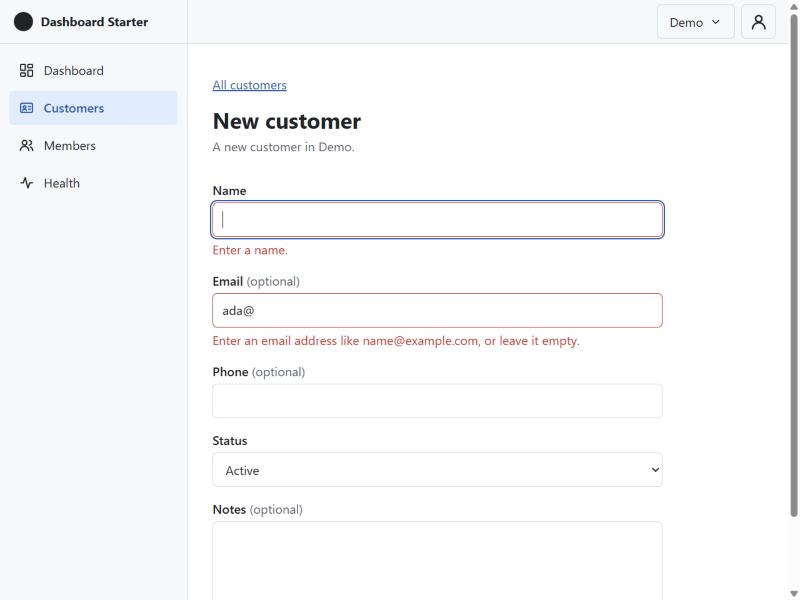
Step 11 is live. Open dashboard.mvmorten.com, click "Try the demo", go to Customers and click "New customer". Click "Add customer" with the form empty. Then start typing a name.
The error shows without a trip to the server, and it goes away as soon as the name is there. That's the visible part of this step. The interesting part is underneath: the browser now checks the same rules as the server, and CI fails if the two ever disagree.
Where the forms started
Post 9 left the customer form plain on purpose. Five fields written out one by one, and errors only from the server. Each input wired its own label, error text and aria-describedby by hand. You could read the whole form top to bottom, and that was the point: this step needed something to improve.
The sign-in and password pages had their own copies of the same wiring, and their own CSS.
No form library
The obvious answer is React Hook Form, maybe with Zod for the rules. Plenty of React apps use both.
The brief leaned toward building it by hand, and Claude Code agreed after reading the code. These forms have five fields at most. None of them repeat, none depend on each other, and the merge screen from post 9 writes values into the form from outside, which is exactly where a library's own state gets in the way.
So src/Web/src/forms/ has a few small components. Field owns the label, the "(optional)" marker, a hint, the error, and the ids that tie them to the input. TextField, SelectField, TextAreaField and PasswordField are each a Field with an input inside. A small useForm hook, about 100 lines with comments, holds the values, the errors, and when to show them.
A library starts to earn its place with repeating groups (order lines, contacts), a long form whose fields depend on each other, or a multi-step wizard. Zod earns its place with a Node back end that can share the schema. This one is C#. The README now says that too, so a fork knows when to change its mind.
The rules, written twice on purpose
The server's rules live in CustomerValidation.cs and PasswordRules.cs. The browser now has a copy of each: customers/rules.ts and auth/passwordRules.ts. Same constants, same order, same messages word for word. Each function names its C# twin, and the C# files point back.
The server is still the authority. A client check is only there so people find out sooner. It's never a security boundary, because anyone can skip the browser and call the API.
There were two other ways to do this:
- Have the API serve the rules, and let the form read the limits from it. That's a request before the form can check anything, and it only covers what fits in data. "Exactly one @, with something on each side" doesn't.
- Generate the TypeScript from the C# at build time. That's the kind of thing this project avoids: a step you have to know about before the code makes sense.
Two plain copies are easy to read. The risk is that they drift apart. So the real work of this step was making drift impossible to miss.
Proving the two copies agree
The test cases live in shared JSON files: 30 for customers, 12 for passwords. Each case has an input, then either the exact errors or what the server stores:
{
  "case": "an email with two @",
  "input": { "email": "ada@[email protected]" },
  "errors": {
    "email": "Enter an email address like [email protected], or leave it empty."
  }
}
The same file runs twice:
npm testruns every case against the TypeScript rules.- A CI step starts a real API and sends every case to it. Customer cases go to
POST /api/customers, and the script checks the error messages, or the trimmed values that came back.
If a rule or a message changes on one side only, one of the two runs fails. To change a rule, you change both copies and add a case.
To make sure the check really checks, Claude Code broke it on purpose. It changed one message in rules.ts, and npm test failed five tests. It changed one message in the JSON, and the API run failed and named the case. Then it put both back.
The drift was already there
Before this step, the change password form said "The new password must be at least 12 characters." The server said "The password must be at least 12 characters."
Small, harmless, and exactly the problem. Two copies written by hand had already drifted, in a project where someone reads every PR. The cleanup PR before this step found it, and the client now uses the server's words.
Michael's tip
Drift happens! Define your rules in a single place if possible!
Here it isn't possible: the same rules have to run in C# on the server and in TypeScript in the browser. When one place isn't an option, the next best thing is a test that fails the moment the copies disagree.
trim() isn't Trim()
This one is easy to miss. JavaScript's trim() and .NET's Trim() don't remove the same characters.
.NET removes U+0085 (an old "next line" character), and JavaScript doesn't. JavaScript removes U+FEFF (the byte order mark), and .NET doesn't.
So a name made of just U+0085 would pass a naive check in the browser, then get "Enter a name." from the server. Nobody types that on purpose, but it can come along with pasted text. The rules modules trim exactly what .NET calls white space, listed by character code, and the shared cases include both characters. The CI run against the API agreed on the first try.
Case-insensitive comparison has the same kind of trap. The password rules refuse your own email as a password, ignoring case. .NET's OrdinalIgnoreCase compares one character at a time. JavaScript upper-cases "ß" to "SS", which would make "STRASSE" equal "straße". The client copy compares one character at a time too. That case is a unit test only, since proving it against the API would need an account with an ß in its email.
When errors show
Nothing shows while you type the first time. Nobody likes being told an email is wrong after two letters.
On submit, every problem shows at once, and focus moves to the first field with one. After that, a field that's showing an error is checked again on every change, so the error goes as soon as it's fixed. Fields without an error stay quiet until the next submit.
Errors are tied to their fields with aria-describedby, so a screen reader reads the error when the field gets focus. Focus moves after the render, not in the same tick. Otherwise it would land on the field before its error is on the page.
There's no error summary at the top. With five fields, focus on the first problem is enough.
A character count that waits
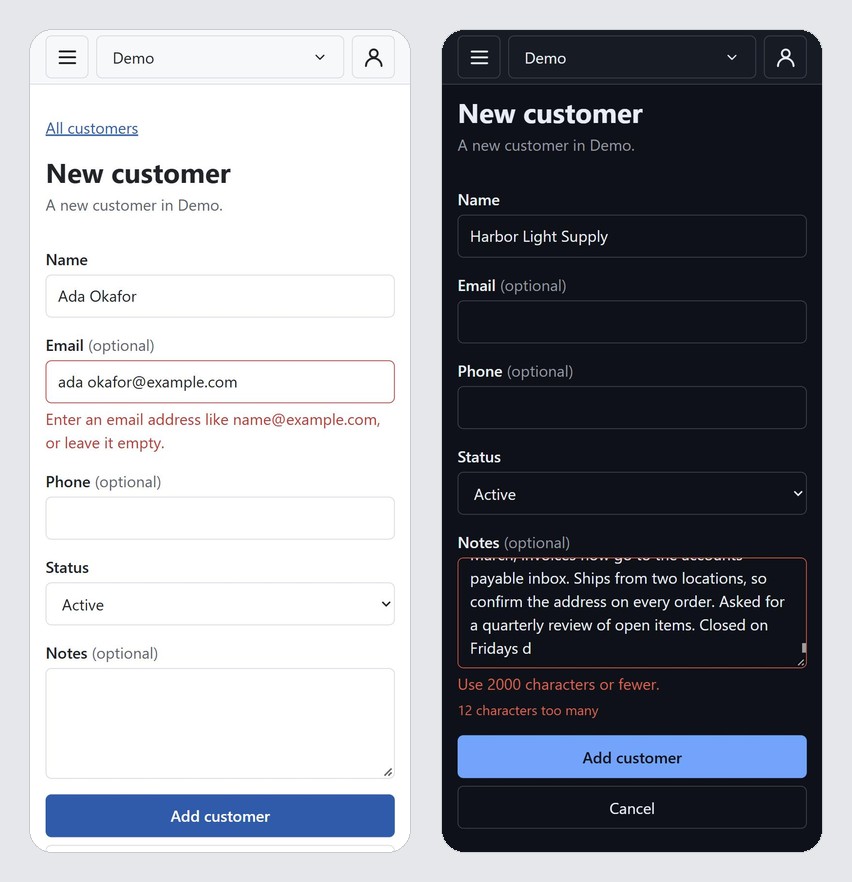
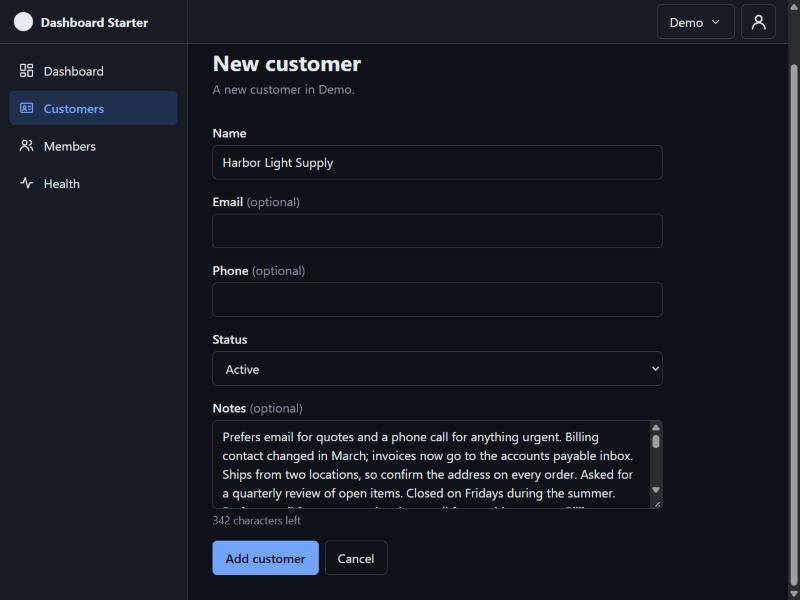
Notes can be 2,000 characters. A counter that changes on every key is noise, so it shows up at 80% ("400 characters left") and turns red past the limit ("5 characters too many"). It counts the trimmed length, like the rule.
A screen reader hears it once typing pauses for a second, not on every key, and never when the page opens.
There's no maxLength on the input. It would cut pasted text short without saying so. The rule says how long is too long instead.
Sign-in gets no client checks
Every form moved to the new components, but not every form got client checks.
Sign in: components only. Every failure still gets the server's one generic message, so nothing can hint at whether an account exists. That rule is from post 5, and a helpful client check would break it.
Forgot password: only "is anything there?". No format check.
Reset and change password: the length, "not your email" when you're signed in, and "The two new passwords don't match." on the second field. That last one is a form check, not a password rule. The server never sees the second copy.
Members role select: left as is. It saves as soon as it changes, inside the grid. It's a control, not a form.
What went wrong
The password rate limit got in the way. The CI run sends about 13 password requests, and the limit is 5 a minute. The rule cases got their own CI step and their own throwaway API, with the limit raised only there. No code change.
CodeQL took a label for a password. It flagged the test script for logging clear text, because a variable was named passwordCase. CodeQL decides what's secret partly by name. The script only prints each case's label, and the passwords in the JSON are made-up values already in the repo. Renaming the variable fixed it. A second alert, "network request depends on file data", describes exactly what the script is for, so it's a false positive.
Invisible characters in the source. Claude Code's file tool turned some \u escapes into the real invisible characters, which broke a regex. That's why the white space list is character codes in a Set now. It's easier to read anyway.
Its own test data, not the code. A surprise "phone" conflict in the merge test came from an earlier 50-digit test phone. It caught that before calling it a bug.
Cleanup before the step
The customer page was 782 lines in one file: the route, the editor, the merge panel, the delete confirm and the read-only view. A PR before this step split it into smaller files next to the page, with no change in behavior.
It was moved by line range, not retyped, and a script checked that every original block was still there unchanged. Then the merge, the delete and "deleted while editing" were checked by hand in two tabs. That way the forms PR shows only the forms work.
Working with AI on this
Same setup: one AI to plan and write the brief, Claude Code to build.
It found the problem before building the fix. The cleanup PR is "just move some code", but it read the password pages on the way and wrote down the drifted message and the trim() difference as notes for the next PR. Both became part of this post.
It broke its own check to prove it works. A test that never fails proves nothing. Changing one message on each side and watching CI fail took a few minutes.
It said what it didn't do. It checked the ARIA wiring in the DOM: what each field points to, where focus goes, when the status region speaks. It didn't listen with a real screen reader, and the PR says so in plain words. That's on the list for later, not hidden.
/security-review found nothing. Client checks run before the server's, never instead of them. Sign-in and forgot password reveal nothing about accounts. The reset token handling didn't change.
What's next
Post 12 is the audit log: who changed what, and restoring a deleted customer. Soft deletes from post 9 kept the rows for exactly this.
The code for this post is tagged v0.11. Try the demo, add a customer with an empty name, and watch the error go as you type.